GUIDES & RESOURCES
Novaber documentation
Novaber · Content reviewed
On this page
Novaber is a local AI app workbench for Windows. Check your environment, install apps and launch them from one desktop interface. Choose a path below to prepare your computer or continue with your task.
Start here
-
New to Novaber: installation and setup
Check Windows, Docker and GPU requirements, then prepare the desktop and runtime.
-
Understand the workbench: choose and launch
Go from choosing an app to a result you can inspect, checking setup, installation, launch and output along the way.
-
Already set up: find an app for your task
Compare use cases, inputs, outputs and hardware needs, with clear availability labels.
-
Explore an example: batch cutouts and export
Follow the interface to understand media import, subject selection, previews and transparent PNG export.
Meet your local workbench
Choose a tool from the app catalog on the left, then review its capabilities, requirements and installation entry on the right. Once the app is ready, open its own interface to import media and process a task. The desktop manages and launches apps; each app provides its own capabilities.
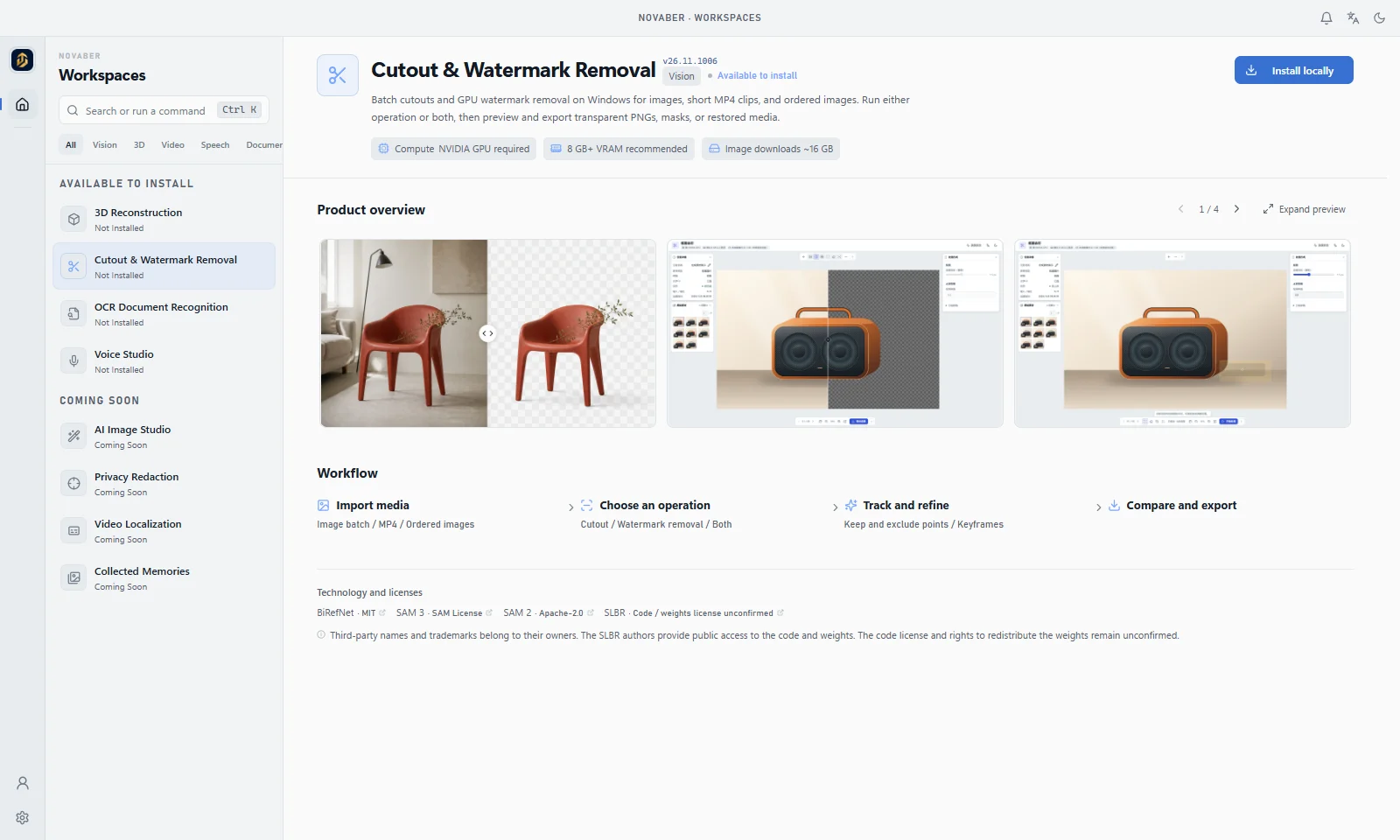
The workbench view uses Cutout & Watermark Removal as an example. Open the image for a larger view. Media is demonstration content; check the current catalog for app availability.
Desktop, apps and account services
- Novaber desktop provides the app catalog, environment checks, installation and launch management, account authorization and updates. Install the desktop, then choose apps separately; desktop and app versions are maintained independently.
- Local apps perform cutouts, reconstruction, recognition or speech tasks in separate containers. Check each app’s GPU, image and model requirements and use its own task interface and exports.
- Account services handle sign-in, account authorization and membership checks. These steps need an account-service connection; local execution does not make every stage offline.
The desktop currently has a proprietary non-commercial license; account entitlements do not grant commercial authorization. Models and third-party components have separate terms. Read licenses and components and data and network boundaries before choosing a workflow.
Continue by task
If you already have a task in mind, open the relevant app reference for inputs, outputs, workflow and limitations:
- Product photos, portraits or short clips: Cutout and watermark removal covers automatic removal, subject selection and exports.
- Multi-view photos or video for 3D scenes: 3D reconstruction explains COLMAP, NeRF and 3DGS workflows.
- Scanned PDFs and images to editable text: OCR document recognition covers text and table review and export formats.
- Scripts, narration and character dialogue: Voice Studio covers previews, voices, track exports and Beta limitations.
Compare tools in the app selection guide, then check your computer's requirements.
When you need help
- Unsure whether your computer is suitable: read system, GPU and storage requirements, then check the selected app. For NVIDIA GPU workflows, check driver major >= 575 and Windows driver >= 576.57 for the CUDA 12.9.1 project baseline; see the driver policy.
- Prefer help with setup: read AI-assisted installation and give the matching versioned skill entry to your assistant to check the environment and readiness.
- Installation or startup errors: start with installation troubleshooting. If the problem remains, follow logs and feedback guidance to prepare versions, errors and reproduction steps.
- Find common questions: use frequently asked questions to locate environment, download, networking and output issues, then follow the relevant operation.
Find more topics in the sidebar or the search above. When you are ready to install, download the official installer.
For setup report fields, custom installation paths and fresh launch evidence, see setup diagnostics and startup verification.
Offline reading, Obsidian and AI knowledge imports: download the bundle and learn how to filter versions, cite sources and update your collection.